
SHAREit: Transfer, Share Files
Smart Media4U Technology Pte.Ltd.Tools
4.356.75K Reviews
- Version
- 6.27.19_ww
- Installs
- 1.00B
- Age Rating
- Everyone
Screenshots

Our Review of SHAREit: Transfer, Share Files
 Analysis by Appyee
When I first reach for SHAREit: Transfer, Share Files, it is usually because a file needs to move now, not after a cloud upload finishes. That immediate usefulness is the app’s strongest argument: it brings sending and receiving files together with tools for handling media and storage. The first week can feel especially appealing if you often pass photos, videos, or games between nearby devices. Whether it earns a permanent place on your phone depends on how often those jobs come up—and whether you enjoy an app that does more than one thing.
Why it feels useful in the first week
Getting a transfer started is straightforward once both people have the app open. I like that the basic idea is easy to explain to someone who is not especially technical: choose what to send, connect with the receiving device, and check that the right files arrive. For a group sharing a batch of photos after an event, that can be less cumbersome than sending each item through a chat thread.
A useful habit is to choose the files deliberately rather than treating a transfer as an all-or-nothing handoff. Before sending a large batch, I would check the selection and confirm the recipient’s device is ready. That small pause helps avoid the familiar annoyance of sending the wrong version of a photo or making someone sort through files they did not ask for.
The app is made by Smart Media4U Technology Pte.Ltd. and sits in the tools category, though its appeal is not limited to file handling. SHAREit is free to install, with optional in-app purchases, and is rated for Everyone. Its current version is 6.26.88_ww, and it supports Android 4.2 or later. That broad Android compatibility can matter when one person in a family keeps an older phone, even though the experience still depends on the devices being able to connect and work together.
Keeping SHAREit useful after the novelty fades
I judge a transfer app by whether I still reach for it once the first successful send stops feeling new. In this section, I’ll look at the routines that can make SHAREit useful over time, the small habits that make handoffs less error-prone, and the point where a simpler tool may suit me better.
Lightning-Fast Transfers
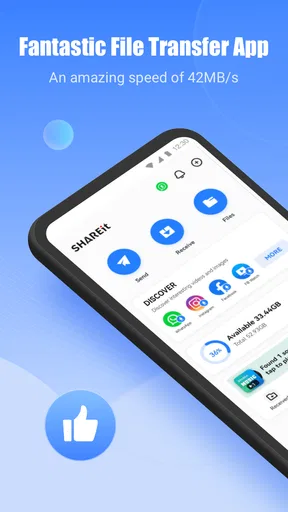
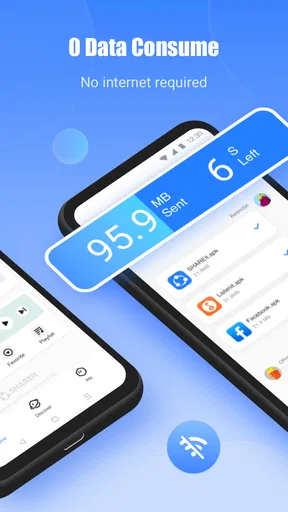
One of the standout features of SHAREit is its speed. We're talking about transferring gigabytes of data in just a few minutes. Whether it's photos, videos, or even apps, SHAREit handles it all without breaking a sweat. Say goodbye to waiting around for files to upload to the cloud or dealing with pesky USB cables.
What really impressed me is the app's ability to transfer files cross-platform. If you're switching between Android and iOS, or even Windows and Mac, SHAREit ensures you won't face any compatibility hassles. It's like having a universal translator for your tech devices.
User-Friendly Interface
Getting started with SHAREit is a breeze. The app sports an intuitive and clean interface that even the least tech-savvy users will find easy to navigate. All it takes is a few taps, and you're ready to transfer files. The app also organizes your files neatly, making it easy to find what you need.
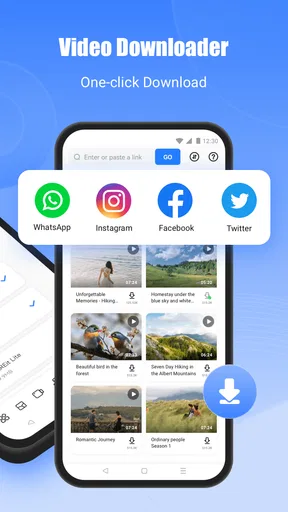
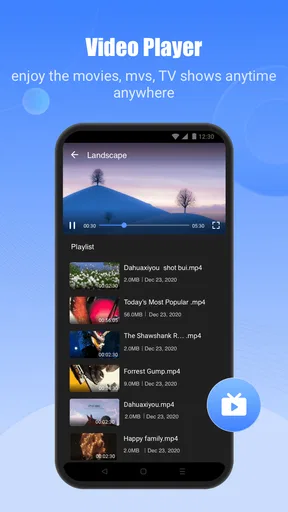
One thing I really appreciate is the app's built-in media player. It allows you to preview photos and videos before you decide to send them, which is a neat touch. Plus, you can play music directly from the app while transferring files, giving you something to groove to while you wait.
Making a transfer routine reliable
In everyday use, the best way to make a quick transfer feel dependable is to think about the whole handoff, not only the send button. If I am sharing a folder of trip photos, I first narrow it down to the images the other person actually needs. Then I ask them to check the received files before we part ways. That is particularly useful when the transfer is the only copy they are expecting; a successful-looking animation is less reassuring than opening a couple of files on the receiving phone.
For a new-phone setup, SHAREit can be handy for moving selected media or other files without relying on a cloud upload. I would still treat it as a practical transfer tool rather than a complete migration plan: important contacts, app settings, and account data may need their own device-transfer or backup process. Keeping that distinction clear prevents the common disappointment of expecting one sharing app to reproduce an entire phone.
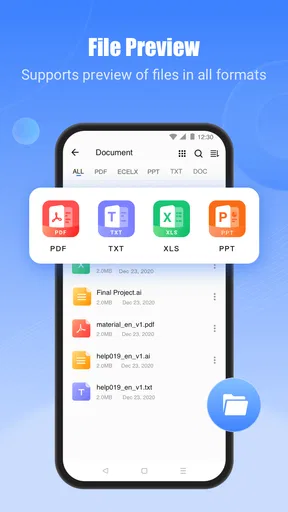
It can also help to use the built-in previews as a quality check. Before sending a video, I can open it in the app and make sure I picked the intended clip rather than a similarly named one. Afterward, the receiver can inspect it too. That is a small workflow improvement, but it saves time when a folder contains several near-duplicates and the recipient is waiting.
Beyond File Sharing
But wait, there's more! SHAREit isn't just about file transfers. The app boasts a plethora of additional features that enhance its utility. For instance, its in-app media player supports a wide range of formats, and the video player offers excellent playback quality. It's like having a mini entertainment hub right in your pocket.
Another cool feature is the app's ability to clean junk files from your device. It’s a handy tool to free up some precious storage space without needing a separate cleaning app. It's this multifunctional capability that makes SHAREit stand out in a crowded market.
When the extras help—and when they get in the way
The media tools are most valuable when I want to inspect a file immediately or keep a video handy without switching apps. They are less compelling if I already have a preferred player and a tidy photo library. A multi-purpose app can reduce app switching, but it can also make the main job—sending a file—feel less central. I would judge the extra sections by whether I actually return to them, not by how many options appear on screen.
The cleanup feature deserves the same practical approach. I would review what it identifies before removing anything, especially if I am short on storage and tempted to clear items quickly. A cleaner is useful when it helps me spot disposable clutter; it is not a substitute for deciding which photos, downloads, or documents I want to keep. If careful storage management is the main reason you are considering the app, a dedicated file manager may offer a more focused routine.
What changes from month to month
SHAREit’s repeat value depends on your habits. If I regularly exchange large files with family, classmates, or coworkers who are nearby and willing to use the same tool, keeping it installed makes sense. If most of my sharing happens in messaging apps, email, or cloud folders, I may only open it occasionally. That is not a flaw so much as a reminder that a transfer utility earns space through recurring situations, not novelty.
Its scale suggests many people find a reason to keep it around: it has over a billion installs, an average rating of 4.3 from around 18 million ratings, and about 57,000 written reviews. Those figures are context, not a promise that every transfer will suit every device or network situation. I would still test the connection with a small, unimportant file before relying on it for a time-sensitive handoff.
For a simple document or a handful of photos, the usual alternatives may be easier. A messaging app is already familiar to both people, while a cloud drive can be better when the recipient is far away or needs access later. SHAREit makes more sense when the files are substantial, the devices are close, and waiting for an online upload would be inconvenient. Its advantage is situational rather than universal.
Privacy and Security
In an age where digital privacy is paramount, SHAREit takes security seriously. Your files are transferred directly between devices, without going through any third-party servers. This peer-to-peer connection ensures your data remains private and secure, which is a huge relief.
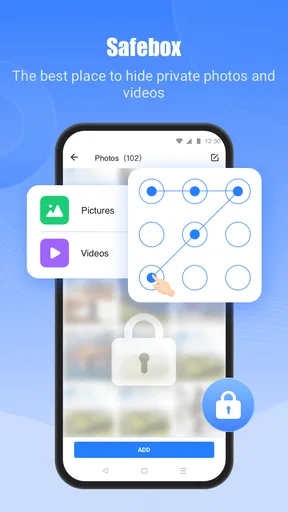
The app also allows you to create secure zones for sensitive files, adding an extra layer of protection. It’s reassuring to know that your data is safe and sound while using SHAREit.
Small points of friction to keep in mind
Even a convenient transfer app asks both sides to cooperate. The recipient needs to be ready to receive, and a connection problem can turn a supposedly quick exchange into a few rounds of checking and retrying. If someone does not want to install another app, sending through a tool already on both phones is often the smoother choice. For remote sharing, a cloud link is usually more practical because it does not depend on both people being together.
There is also a trade-off in keeping a broad utility installed: extra functions may be useful, but they can make the app feel busier than a single-purpose sender. I would keep SHAREit if I used its transfer flow often enough to justify opening it; I would skip it if I only shared occasional small files and already had a comfortable alternative. The optional purchases, which range from nineteen cents to $7.99 per item, are another reason to check what is being offered before buying anything. The core question is whether the free experience already covers your routine.
SHAREit is not a replacement for a considered backup. A transfer moves selected files between devices; it should not be treated as the only safe copy of important memories or work. For irreplaceable material, I would keep a separate backup in a place I can access later. That simple distinction makes the app easier to use responsibly and avoids confusing a one-time handoff with long-term storage.
Conclusion
All in all, SHAREit: Transfer, Share Files is a solid choice for anyone looking to transfer files quickly and efficiently. Its user-friendly interface, lightning-fast speeds, and extra features like media playback and device cleaning make it a must-have app.
Whether you're sharing vacation photos with family or transferring work files between devices, SHAREit handles it all with ease. So, if you haven’t tried it yet, give it a go and experience the convenience firsthand. You might just find it becomes one of your most-used apps.
Who I would recommend it to
I would recommend it most to people who often move sizeable files between nearby devices, especially when internet access is limited or a cloud upload would slow the job down. It also suits households where people exchange photos and videos regularly and can agree on one straightforward method. The ability to preview media and use the app’s player gives it a little more day-to-day usefulness than a bare transfer screen.
I would point occasional sharers toward whatever they and their recipients already use. If you mostly send a quick image to someone in another city, messaging or cloud storage is less dependent on both devices being present. If your goal is a full phone migration, use the relevant setup and backup tools as well. SHAREit is at its best when the task is a direct exchange, not when asked to solve every kind of file or device problem.
My lasting verdict is practical: this is worth keeping if real transfers recur in your week or month, and easy to leave behind if they do not. The first successful send is satisfying, but the stronger reason to retain it is having a familiar option ready when a large batch of files needs to move without a long wait. I would install it for that specific convenience, learn the receiving flow before I urgently need it, and keep my important files backed up separately.
How SHAREit: Transfer, Share Files Compares
Full ComparisonChoose SHAREit for broad, offline sharing, Files by Google for everyday Android storage management, or Smart Switch for moving data to a Samsung phone.
| App | Developer | Rating | Price |
|---|---|---|---|
 SHAREit: Transfer, Share FilesThis App | Smart Media4U Technology Pte.Ltd. | 4.3 | Free |
 Files by Google | Google LLC | 4.5 | Free |
 Samsung Smart Switch Mobile | Samsung Electronics Co., Ltd. | 3.9 | Free |
Verdict
Strengths of SHAREit: Transfer, Share Files
- Fast file transfer speeds
- Supports cross-platform sharing
- Easy-to-use interface
- No internet required for sharing
- Multiple file formats supported
Limitations of SHAREit: Transfer, Share Files
- Contains intrusive ads
- Large app size
- Occasional connectivity issues
- Some features require permissions
- Privacy concerns with data handling
Other Releases by Smart Media4U Technology Pte.Ltd.
View All
SHAREit Lite - Fast File Share
Productivity4.4
Similar Picks in This Category
View All
Google LLC4.0

Gboard - the Google Keyboard
Google LLC4.5

Google Play services
Google LLC4.3

Google Play Store
Google LLC4.9

Files by Google
Google LLC4.5

Google Lens
Google LLC4.7
You May Also Like
View All
Frequently Asked Questions
What is SHAREit and how does it work?
SHAREit is a file sharing application that allows users to transfer files, such as photos, videos, music, documents, and apps, between devices without the need for an internet connection. It uses Wi-Fi Direct technology to create a hotspot, enabling high-speed file transfers. Users simply need to connect to the hotspot created by the app and select the files they wish to share.
Is SHAREit secure for transferring files?
SHAREit is generally considered secure for file transfers as it establishes a direct connection between devices, minimizing the risk of data interception. However, users should ensure both devices are properly authenticated and only connect to known devices to prevent unauthorized access. It’s also important to keep the app updated to the latest version for improved security features.
Does SHAREit support cross-platform file transfers?
Yes, SHAREit supports cross-platform file transfers, allowing users to share files between Android, iOS, Windows, and Mac devices. This flexibility makes it a versatile tool for users with multiple devices, ensuring compatibility and ease of use across different operating systems. Simply install SHAREit on each device to start transferring files.
Are there any file size limitations when using SHAREit?
One of the advantages of SHAREit is that it does not impose any file size limitations, making it ideal for transferring large files such as full-length movies or high-resolution video files. This feature sets it apart from many other file sharing services that often have restrictions on file sizes, allowing for seamless sharing of any file type.
Does SHAREit require an internet connection to work?
No, SHAREit does not require an internet connection to transfer files. It uses Wi-Fi Direct technology to create a local hotspot between devices, which facilitates file transfers. This means users can share files without using mobile data or Wi-Fi, making it a convenient option for offline transfers. However, an internet connection is needed to download the app and access certain online features.
